The road from SOAR and OAuth to hell is paved with MFA claims
Introduction to OAuth
OAuth is an authorization framework whose main purpose is to change the way third-party applications access data from another services (photos, calendar, contacts and so on).
Before OAuth, web applications needed usernames and passwords to gain access and this brought up multiple problems:
- compromise of third-party web app meant your other account was also compromised
- there were no fine grained permissions defining what web applications can access on a behalf of user, in theory third-party could delete all your data or steal it if compromised
- information in the logs only contained username so there was no clear distinction if resource was accessed by an actual user or third-party application which was given credentials
OAuth solves these problems and today two types of OAuth grant types that are used the most are Authorization Code and Client Credentials.
Both allow third-party applications access to resources of another service or web application, but the contexts in which they were intended to be used are quite different.
Authorization Code was intended to be used when third-party application requires access to data of some other service on a behalf of user. It’s typically used in web apps, mobile apps and desktop apps.
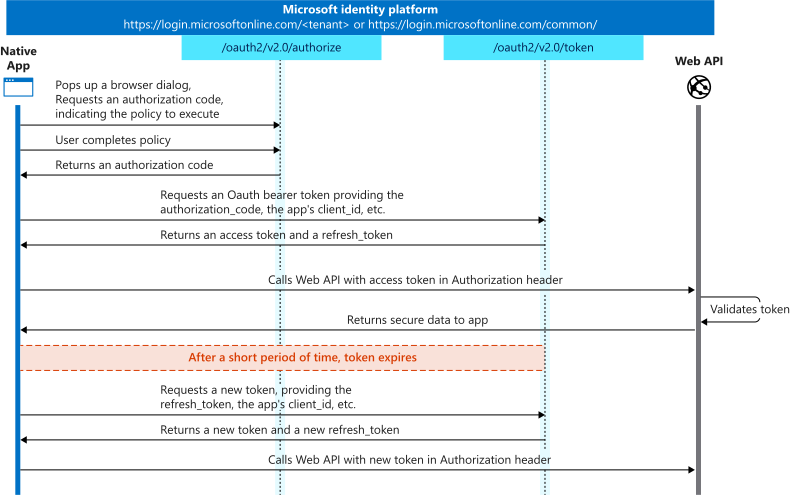
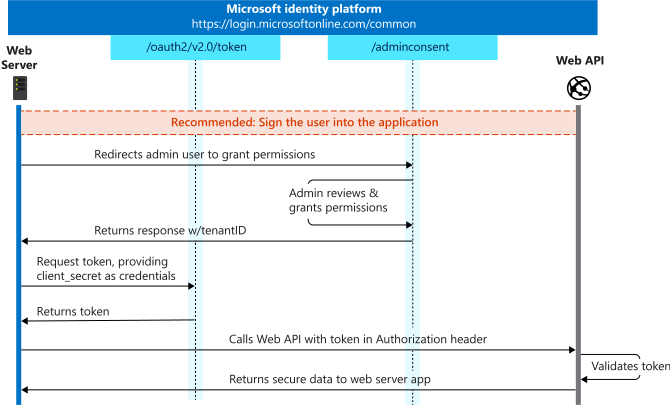
Client Credentials was intended to be used for service-to-service communication (cron jobs, microservices or SOAR automations). Such background jobs cannot pass interactive logins so this grant type is preferred.
Some context
I have been tasked with doing integration of SOAR and Partner Center in order to automate some daily repetitive work across multiple tenants. The integration needs to run 24/7 without user involvement and interact with multiple tenants.
Despite this workload model, Microsoft decided that in order to access Graph API endpoints that deal with Partner Center, JWTs need to have MFA claims. To satisfy this requirement Authorization Code flow must be used and this is were problems being.
Motivation for Authorization Code flow
Most of attackers gain initial access via compromise of the weakest link, humans.
Multi-factor authentication, especially phish-resistant variant is effective at preventing the compromise of the account even if user wanted to provide credentials to a malicious website.
However, background jobs in M2M communication are not susceptible to phishing in the same way humans are. These workloads do not interact with untrusted content, the token acquisition endpoints are statically configured and not influenced by user-controlled input. Forcing interactive authentication mechanisms such as Authorization Code flow by requiring MFA claims in JWTs provides little security benefit while adding unnecessary operational complexity and other security risks.
How this fails in practice

The /authorize endpoint
Before user visits /authorize endpoint, he or she must spin up a local HTTP handler which was specified as redirect URI in the configuration of app registration to which authorization code will be submitted via HTTP GET request as a query string parameter.
Although this aspect of Authorization Code flow is somewhat painful it’s doable but the real pain is not visible upfront and brings different set of problems.
Tossing PIM out the window
In Microsoft Azure, app registrations have 2 types of permissions, delegated permissions and application permissions. delegated permissions must be granted when Authorization Code grant type is used, which requires some additional approval steps, consent pages from both user and admin sides.
delegated permissions in the app registration merely define which scopes the application can request. The actual authorization still depends on the privileges of the signed-in user, which in this case requires the Security Administrator role.
Issue here is that automation depends on the lifecycle of user’s role which directly impacts the uptime of the background job. If the role is activated via PIM and later expires, delegated tokens become invalid and the automation stops working. To prevent outages, Security Administrator role must be assigned permanently.
Over-privileged role
Besides violation of just-in-time access there is also violation of the principle of least privilege.
There is no other more narrow role which would allow the user that must bootstrap the setup of automation service and is thus given access to multiple other products such as Defender, Intune, M365 and Conditional Access configuration in Entra ID.
Tying background jobs lifecycle to user identity lifecycle
The universe tends toward entropy. People leave, roles change, accounts get disabled even during sick leave and things inevitably break. When automation depends on a specific user holding privileged roles to mint and refresh delegated tokens the system becomes operationally fragile. If that user is unavailable or their account is terminated, every refresh token tied to that identity becomes invalid, forcing a full re-bootstrap of the integration - reassigning permanent roles, performing MFA again and spinning up a local redirect handler just to capture a new authorization code. What should be a resilient background workload instead becomes tightly coupled to the lifecycle and availability of a single human identity.
Common solution is to set up a “service” account, but service account must pass MFA. In case tenant allows login via TOTP MFA there is a risk someone exports the TOTP seed/secret, luckly TOTP is not that common today and FIDO2 is being embraced more and more. However, even if FIDO2 is set up, whoever is supposed to keep it save becomes a single point of failure and still it’s something that can be forgotten and stolen afterwards. The breakglass account like setup could be used with 2 envelopes (key A, PIN B and key B, PIN A) but such setup is still susceptible to disturbance of future maintenance needs if only 1 envelope was stolen. 3 envelopes, 3 secure locations, don’t even get me started on that ceremony.
The log problem
One of the original design goals of OAuth was to provide clear audit separation between users and applications performing actions on their behalf.
When delegated tokens are used for background automation, this distinction becomes blurred. In the event of token leakage and abuse, audit logs attribute activity to the specific user who originally authorized the integration, even if that user did not directly initiate the actions in question.
If a dedicated service account is used instead of a real user identity, audit attribution becomes less problematic if the account is clearly named to reflect its automation purpose.
The scale problem
Now, scale this to Managed Security Service Provider with 3 Microsoft Azure tenants in 3 different markets and some more to come.
Requests to the Graph API were happily rejected with Unknown Error when guest account was used, meaning more administrative work (creating new accounts, permanent role assignments and setting up MFA) had to be done just to touch couple of REST endpoints.
The AAGUID problem
While working with one of the three tenants, it was not immediately obvious that the Key Restriction Policy was causing the issue. The only clue provided was a correlation ID, and the failure was ultimately due to a missing AAGUID when attempting to register a FIDO2 security key for the service account.
I did remember at some point there is tenant level FIDO2 configuration page which allows administrators to enforce attestation of FIDO2 keys but even after adding AAGUID and registering the key, login with that security key was failing. Error did not state anything useful besides that the “passkey” (in this case FIDO2 security key) cannot be used because of the policy and that I should contact the administrator.
The colleague helping me out with this thought it might be the AAGUID problem again and he was right. After adding rest of the AAGUIDs for 5.7 version of the Yubikey firmware the login worked. Microsoft obviously has a problem on backend with AAGUID lookup during login, which is weird because why would the AAGUID lookup for login be different from the one during registration.
Anyways, this whole security key setup for only one service account took long. The endless troubleshooting and constant experimentation felt like it would never end even before I could get to the security key setup due to some specific configuration of MS tenant settings and really tight Conditional Access policy.
The inconsistency problem
Graph API will allow you to access mailboxes with JWT that has no MFA claims.
If e-mails don’t represent some of the most sensitive data in the corporate world (legal documents, intellectual property, incident response information and so on) I don’t know what does.
I must call out Microsoft for being inconsistent with it’s push towards use of Authorization Code flow.
Conclusion
The road to hell is indeed paved with good intentions.
I understand there were some issues with Partner Center integrations in the past but refresh and access tokens can leak even after Authorization Code flow is finished and the damage can be done regardless.
In most enterprise environments all administrators are required MFA. The same admin which grants application permissions in app registration has to pass MFA so I really don’t see a point of Auth Code flow here.
Client Credentials grant type was not removed from OAuth 2.1 draft nor did the author of OAuth 2.1 state in any way, shape or form that it is less secure.
Because of the past issues 1, Microsoft introduced more problems under some popular assumptions that at first seem like a good practice. In this case, that MFA should be used everywhere.